September 24, 2026
The Reflected XSS Methodology: 11 Labs Behind $5,000+ in Bounties and 80+ Pentests
The Reflected XSS Methodology: 11 Labs Behind $5,000+ in Bounties and 80+ Pentests

Salman Khan


Fiza Nadeem is an SEO content writer at ioSENTRIX with 2.5+ years of experience in content writing, copywriting, and SEO.
Application security best practices are the habits, controls and tests that keep software from being the easiest way into your business. Most breaches that start with an application need no novel exploit, just a missing access check, a leaked secret or a stale dependency. This guide covers the concepts behind application security (AppSec), twelve practices that hold up under attack, examples of what goes wrong, and the tools that find problems first.
Application security is the practice of finding, fixing and preventing security weaknesses in software across its whole lifecycle, from design and coding through testing, deployment and operation. It covers the code you write, the libraries you import, the APIs you expose and the way it is all configured. The goal is not a clean scan. The goal is software that resists misuse when someone is actively trying to break it.
"AppSec" is shorthand for the same discipline. An AppSec program is the organized version: policy, training, threat modeling, secure coding, security testing and vulnerability response, run as a repeatable process rather than a one-time cleanup. For the fuller background, see What Is Application Security?.
Application security best practices are the twelve activities below, ordered in the sequence a team meets them: know what you have, design and build well, test hard, then run safely. None replaces the others. A web application firewall does not fix a broken authorization check, and a clean static-analysis report says nothing about your cloud permissions.
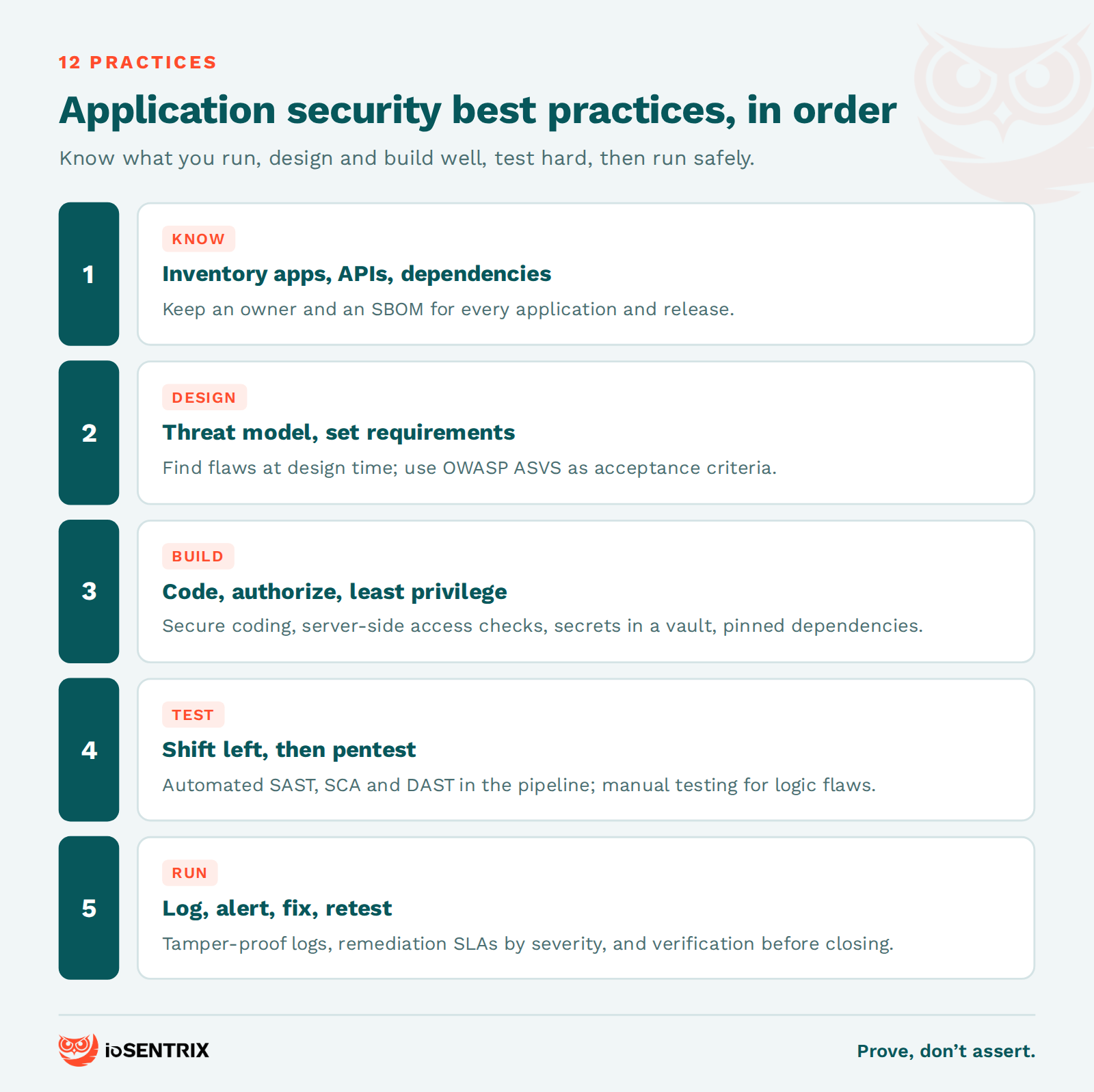
You cannot secure what you do not know exists. Maintain a living list of every application, API endpoint and third-party component in production, with an owner and the data it touches. Generate a software bill of materials (SBOM) per release so you can answer "are we exposed?" in minutes when the next library vulnerability lands.
Threat modeling asks four plain questions: what are we building, what can go wrong, what will we do about it, and did we do a good enough job. Do it at design time, when a fix is a diagram change rather than a rewrite, and focus on trust boundaries: where input enters, where privilege changes, where data leaves. Our guide to threat modeling in AppSec fits the method into sprint planning.
Write down what "secure" means for this application before anyone codes it. The OWASP Application Security Verification Standard (ASVS), now at version 5.0, supplies verifiable requirements for authentication, session management, access control, input handling and cryptography. Pick a level, adopt what applies, and make the requirements acceptance criteria.
Most injection, cross-site scripting and deserialization bugs come from a small set of avoidable patterns. Adopt a coding standard per language and enforce it with linters and code review. Validate input against an allowlist, encode output for its context, use parameterized queries, handle errors without leaking stack traces, and never write your own cryptography.
Authentication proves who a user is; authorization decides what they may do. Both must be enforced server-side on every request, not just in the UI. Broken Access Control has been the top OWASP Top 10 category since 2021 and stays at A01 in the 2025 edition. The classic failure is an insecure direct object reference: change an ID in the URL and read someone else's record.
Give users, services, containers and cloud roles the minimum permissions they need. Over-privileged service accounts and wildcard IAM policies turn a small bug into a full compromise, because the attacker inherits whatever the compromised component could do. Review privileges on a schedule, and treat API keys and workload identities with the same rigor as human accounts.
Hard-coded credentials, secrets in repositories and default settings are among the easiest findings in any penetration test. Store secrets in a vault, rotate them, and scan repositories for leaks. Ship with secure defaults: debug off, admin interfaces restricted, verbose errors suppressed. Security Misconfiguration sits at A02 in the OWASP Top 10:2025 for a reason.
Modern applications are mostly other people's code. Pin dependency versions, run software composition analysis (SCA) on every build, verify package integrity, and restrict what your CI/CD pipeline can reach. OWASP added Software Supply Chain Failures as A03 in the 2025 Top 10 because a compromised package or build step is increasingly the entry point. See our post on software supply chain security.
Automate security testing in the pipeline so developers get feedback while the code is fresh: static analysis on pull requests, dependency checks on every build, dynamic scans against staging. Then keep testing after release, because configuration drift and new attack techniques do not show up in a pre-merge scan. Shift-left lowers the cost of a fix; it does not remove the need to test the running system.
Scanners find known patterns. A skilled tester finds business logic abuse, chained low-severity issues and authorization flaws that no tool flags. Schedule a web application penetration test at least annually and after significant changes, scope it to include APIs and every authenticated role, and demand evidence for each finding. A pentest that cannot demonstrate exploitation is a vulnerability scan with a higher invoice.
Log authentication events, authorization failures and high-value transactions with enough context to reconstruct an attack, and send those logs somewhere an attacker cannot delete them. Alert on patterns that matter: credential stuffing, privilege escalation attempts, unusual data access. OWASP lists Security Logging and Alerting Failures at A09:2025 because breaches are routinely discovered late for exactly this reason.
A finding that sits open for a year is a decision, not a backlog item. Set remediation timelines by severity, track them, and retest fixes before closing them. Verification is the step teams skip most often, and it is what separates "we patched it" from "we proved it is patched." Fold the lessons back into your coding standard so the same class of bug does not return.
Application security examples fall into two groups: controls you put in place, and vulnerabilities that appear when those controls are missing. The examples below are composites drawn from common assessment patterns, not any one client.
Examples of controls: a parameterized query that treats user input as data, never as SQL. An authorization middleware that checks record ownership on every API call. Multi-factor authentication on the admin console. A secrets vault that issues short-lived database credentials to each service. A dependency scanner that blocks a build when a critical CVE appears in a direct dependency.
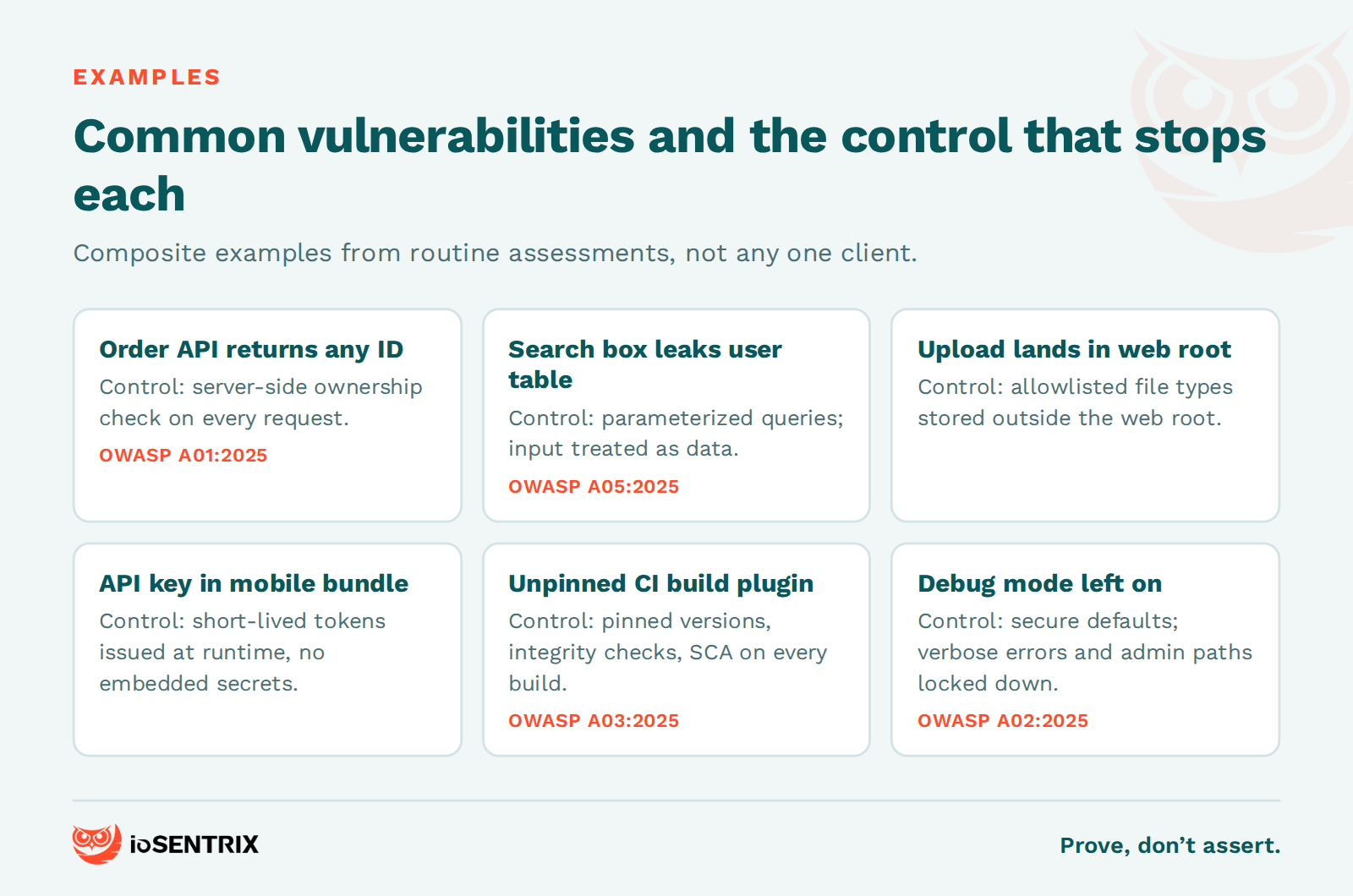
Examples of vulnerabilities: an e-commerce API returns any order when given its numeric ID, so a customer enumerates other customers' orders by counting up. A search field passes its input straight into a database query and leaks the user table. A file upload accepts any extension and stores the file inside the web root. A mobile app ships an API key in plain text. A CI job pulls an unpinned build plugin, and a malicious release of it exfiltrates environment variables. None of these needs a zero-day.
The OWASP Top 10:2025 is the shortest useful map of application risk: Broken Access Control, Security Misconfiguration, Software Supply Chain Failures, Cryptographic Failures, Injection, Insecure Design, Authentication Failures, Software or Data Integrity Failures, Security Logging and Alerting Failures, and Mishandling of Exceptional Conditions. It is an awareness document, not a compliance standard, but if your testing skips any of the ten you have gaps. For hands-on testing of the first category, see Mastering IDOR and broken access control.
The types of application security are usually described by what is being protected: web applications, mobile applications, APIs and cloud-hosted applications. The practices are the same across all four; the attack surface and tooling differ.
Web application security focuses on the browser-facing layer: sessions, injection, cross-site scripting, access control and server misconfiguration. Mobile application security adds the device: insecure local storage, weak certificate validation and reverse engineering of the app package. API security concentrates on authentication between services and object- and function-level authorization, because APIs expose business logic directly to clients that never see your UI. Cloud application security covers identity and access management, workload configuration and the shared responsibility split with the provider. Most real products are all four at once, and an attacker picks whichever has the weakest control.
Network application security is the overlap between the two disciplines, and it is a division of labor rather than a choice. Network security controls (firewalls, segmentation, intrusion detection, TLS termination and VPNs) decide who can reach an application and over what path. Application security controls decide what an authenticated request is allowed to do once it arrives. A firewall cannot tell that a valid user is requesting someone else's invoice, and an application cannot stop a flat network from exposing the database to a compromised workstation. Zero trust, as defined in NIST SP 800-207, moves the emphasis from the network perimeter to verifying every user, device and request, which makes application-layer authorization more important, not less. For the infrastructure half, see our network security infrastructure best practices.
Use a combination: static analysis (SAST) while writing code, software composition analysis (SCA) for dependencies, dynamic analysis (DAST) against a running build, and manual penetration testing for logic and authorization flaws. Runtime protection (WAF, RASP) and cloud posture tooling (CNAPP) add depth. No single tool class finds more than a fraction of real issues.
SAST analyzes source code or binaries for known vulnerable patterns such as injection. It scales and points to the exact line, but OWASP's own guidance notes that SAST tools produce high false-positive rates and are weak at authentication, access control and configuration issues, which are not visible in code alone. DAST probes the running application from the outside and catches runtime and configuration problems SAST cannot, but it misses logic flaws. SAST vs DAST explains where each fits. IAST instruments the application during functional tests to combine both views, at the cost of setup effort.
SCA inventories third-party components against vulnerability databases and is the fastest win for most teams. Mobile application security testing (MAST) adds platform-specific checks for iOS and Android. RASP runs inside the application and blocks attacks based on what the code is doing; a WAF filters HTTP traffic in front of it. Neither is a substitute for fixing the vulnerability. A cloud-native application protection platform (CNAPP) is a cloud-delivered platform combining posture management, workload protection and pipeline risk analysis for applications on AWS, Azure, Google Cloud and Kubernetes. It is a cloud security product category, not a coding methodology.
An application security strategy is a written plan for how security requirements, activities and ownership are distributed across the software lifecycle, and how you will measure whether it works. The three models most teams borrow from, a secure SDLC, shift-left and DevSecOps, are compatible.
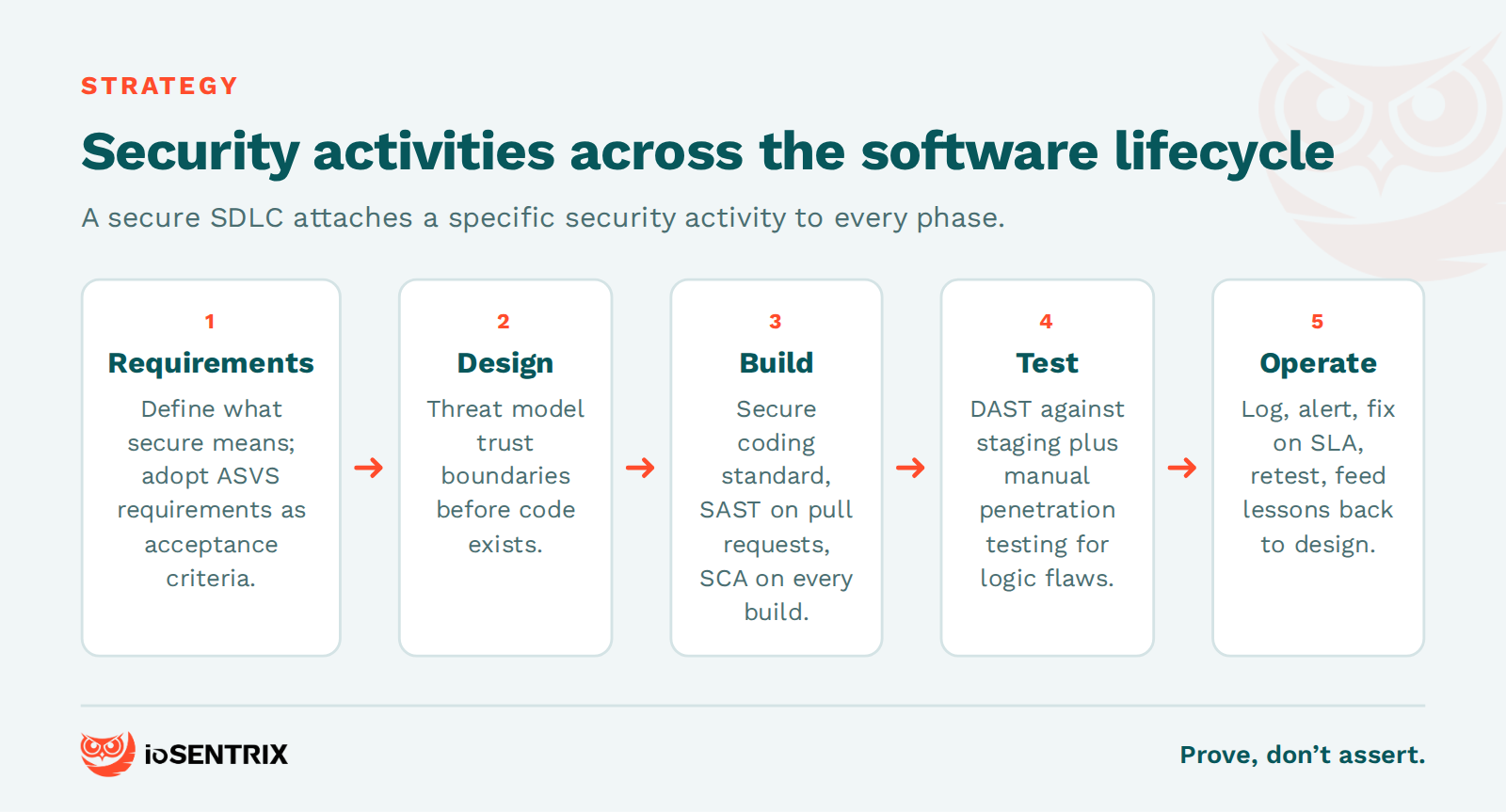
A secure software development lifecycle (SSDLC) attaches activities to each phase: requirements in planning, threat modeling in design, secure coding and SAST in build, DAST and penetration testing in verification, monitoring in operations. How to achieve application security with a secure SDLC lays out the phase-by-phase version. Shift-left is the principle that the earlier a defect is found, the cheaper it is to fix. DevSecOps is the operational form of that principle: security automated into the CI/CD pipeline with shared ownership. Bolting a scanner onto a pipeline is not DevSecOps; the difference is whether findings are triaged, owned and fixed as part of normal delivery. AppSec vs DevSecOps draws that line.
Two frameworks give you a maturity yardstick. OWASP SAMM defines five business functions (Governance, Design, Implementation, Verification and Operations) with fifteen practices to self-assess against. The NIST Secure Software Development Framework, SP 800-218, groups practices into Prepare the Organization, Protect the Software, Produce Well-Secured Software and Respond to Vulnerabilities. Aligning with either structures your program; it is not a certification and does not by itself satisfy a regulator. Measure the strategy by outcomes: time to remediate by severity, share of applications with a current threat model, and findings that recur after being closed.
AppSec is the discipline of securing applications. DevSecOps is one way of operating it, with security automated into the delivery pipeline and owned jointly by development, security and operations. You can run AppSec without DevSecOps; you cannot run meaningful DevSecOps without AppSec underneath it.
If you can only do one thing, enforce server-side authorization on every request, because broken access control is the top OWASP category and the most common critical finding in application assessments. If you can do two, add a dependency inventory with software composition analysis.
Automated tests (SAST, SCA, DAST) should run on every build or at least every release. Manual penetration testing should happen at least annually and after any major architectural change, new authentication flow or new external integration. PCI DSS, for one, treats annual testing plus testing after significant changes as a floor.
Web application security is the subset of application security concerned with browser-accessible applications and the APIs behind them: session management, input handling, access control, client-side protections and server configuration. The OWASP Top 10 and the OWASP Web Security Testing Guide are its most used references.
ioSENTRIX is a CREST-accredited, ISO/IEC 27001 certified penetration testing firm. Our application security services cover threat modeling, secure code review, web, API and mobile penetration testing, and AppSec program development, delivered by testers who show you the exploit path rather than a scanner export. We do not check whether a control exists on paper; we test whether it holds when someone is trying to get past it.
If you want a clear read on where your applications stand against the practices above, talk to us about a scoped assessment.