
September 24, 2026
The Reflected XSS Methodology: 11 Labs Behind $5,000+ in Bounties and 80+ Pentests
The Reflected XSS Methodology: 11 Labs Behind $5,000+ in Bounties and 80+ Pentests

Salman Khan


Fiza Nadeem is an SEO content writer at ioSENTRIX with 2.5+ years of experience in content writing, copywriting, and SEO.
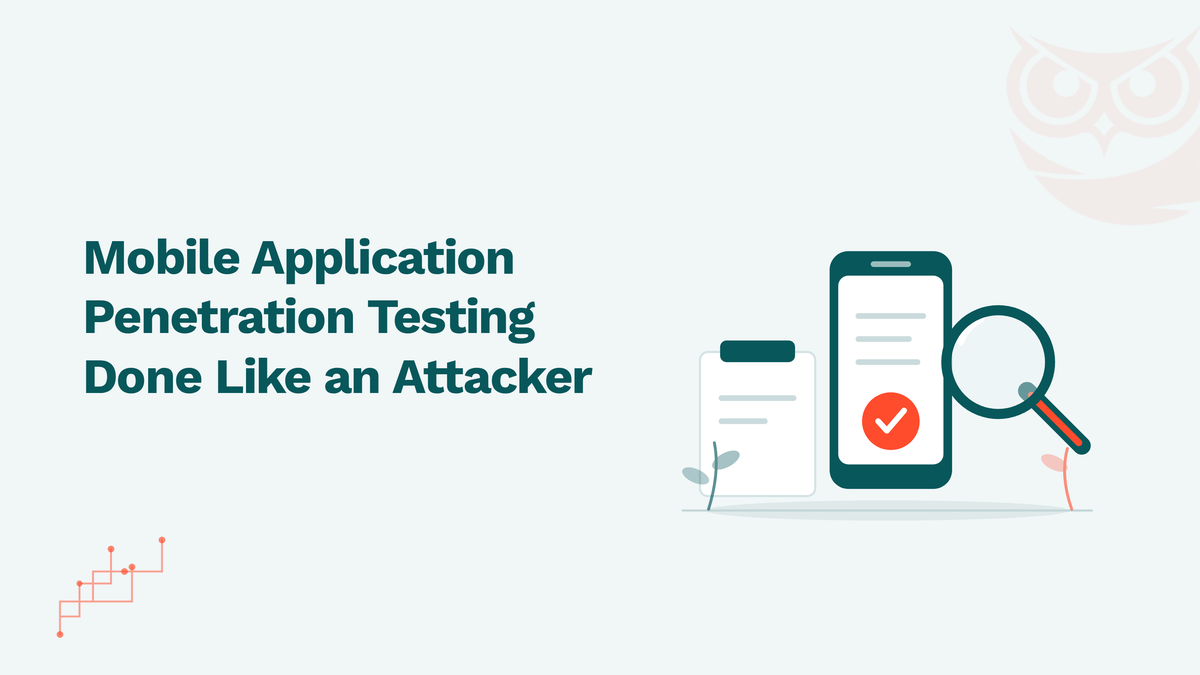
Mobile application penetration testing is the process of attacking an iOS or Android app the way a motivated adversary would, on a device you control, to find the vulnerabilities that scanners and code review miss. This guide covers the mobile app penetration testing methodology step by step, how OWASP MASVS and MASTG structure the work, the tools testers actually use, how iOS and Android testing differ, what a mobile application penetration testing service includes, and a checklist you can hand to your own team. It is written for security leads and engineering managers who need to scope a test, judge a report, or decide what "tested" should mean for their app.
Mobile application penetration testing is a structured security assessment in which testers reverse engineer, instrument and attack a mobile app and its backend APIs to find exploitable weaknesses before an attacker does. It covers the app binary, local data storage, the device platform controls the app relies on, the network traffic it sends, and the server-side endpoints that traffic reaches. The output is a set of verified findings, each with reproduction steps and a fix, not a list of scanner alerts.
The word "verified" is the point. A static scanner can flag a hardcoded string that looks like a key. A penetration test extracts the key from the binary, uses it against the production API, and shows what data comes back. That distinction matters when you are deciding whether a finding is a release blocker, and it is the reason a mobile pentest is a different deliverable from a mobile app security scan.
Mobile app penetration testing differs from web application penetration testing in one fundamental way: the attacker controls the client. In a web app, the browser is a sandbox the server can reasonably distrust. In a mobile app, the attacker has the compiled binary, can run it on a rooted or jailbroken device, can hook any function at runtime, and can read every byte the app writes to disk. Anything the app "protects" on the client is only as strong as the effort needed to defeat it on a device the attacker owns.
That changes the technique. Web testing centers on an intercepting proxy and the server's handling of requests. Mobile testing adds reverse engineering of APK and IPA files, dynamic instrumentation to bypass client-side checks such as root detection and certificate pinning, and inspection of local storage, logs, keychains and inter-process communication. The backend APIs still get tested, and they are where most of the high-severity findings land, because the mobile client usually talks to endpoints that were never exposed to a browser and never hardened for one. Our web and API penetration testing practice covers that server side; a mobile engagement covers both ends.
The mobile app penetration testing methodology has six phases: scoping and rules of engagement, reconnaissance, static analysis of the binary, dynamic analysis on an instrumented device, exploitation of confirmed weaknesses against the backend, and reporting with retest. The phases are sequential in name only; in practice static and dynamic analysis feed each other, and exploitation loops back to discovery whenever a new endpoint or secret surfaces.
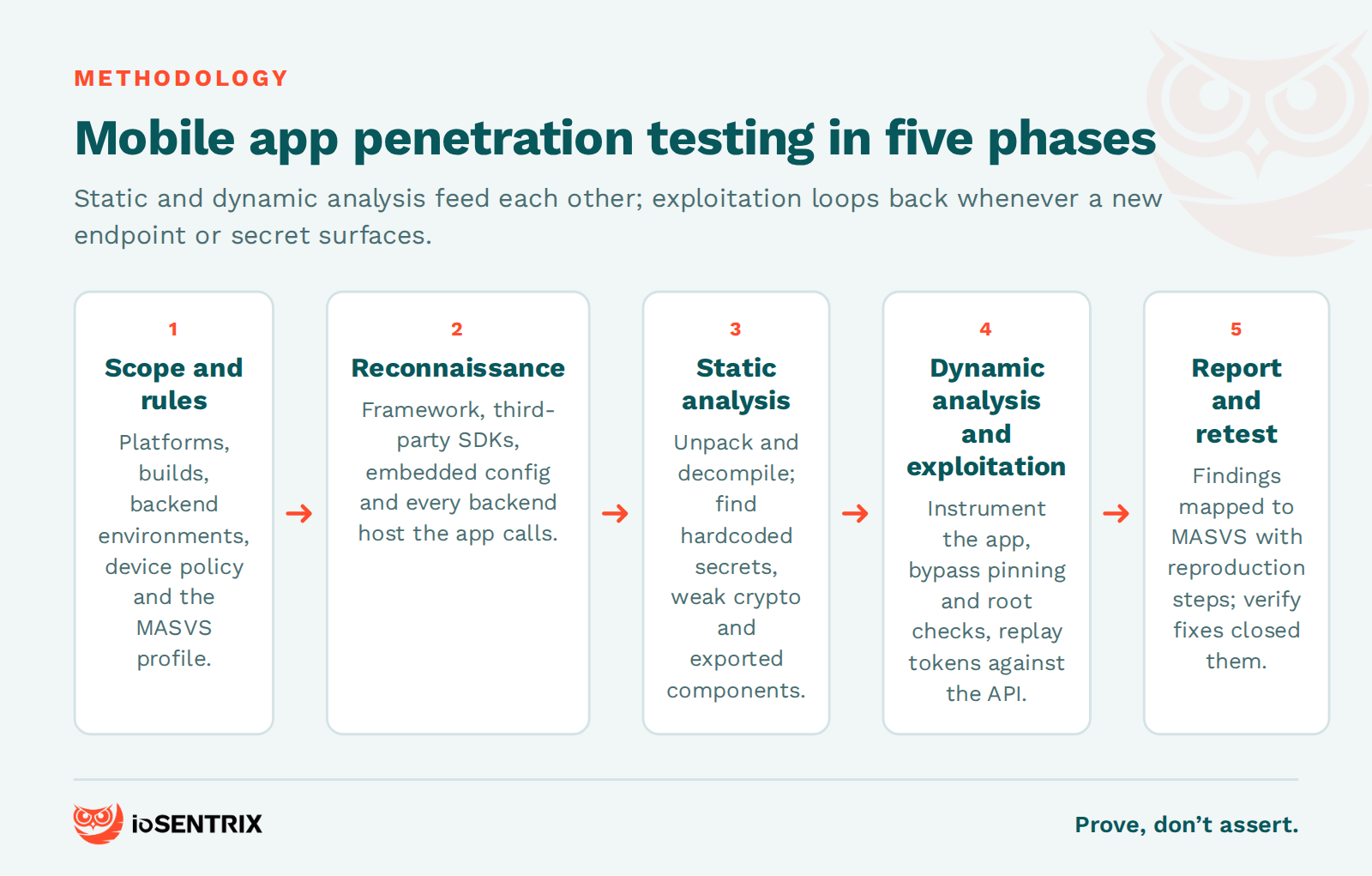
Scoping decides which platforms (iOS, Android or both), which builds (release, debug, or a build with pinning disabled), which backend environments, and which testing methods are in bounds. The rules of engagement should say whether rooted or jailbroken devices may be used, whether production APIs may be hit and at what rate, how test accounts are provisioned, and how sensitive data found during testing will be handled. This is also where the MASVS profile is chosen, which sets the depth of testing for the rest of the engagement.
Reconnaissance maps how the app is built and what it talks to. Testers identify the framework (native, React Native, Flutter, Kotlin Multiplatform), third-party SDKs for analytics, payments and advertising, embedded configuration, and every backend host and API path the app references. Most apps are not self-contained, and the SDK list alone often surfaces outdated libraries with known vulnerabilities or data collection the product team did not know about.
Static analysis examines the app without running it. For Android that means unpacking the APK with apktool, decompiling with jadx, and reading the manifest for exported components, permissions and debug flags. For iOS it means extracting the IPA, inspecting the Info.plist and entitlements, and disassembling the binary. The goal is to find hardcoded secrets, weak or misused cryptography, insecure storage calls, and the client-side logic that dynamic testing will need to bypass. Reverse engineering at this stage also produces the map of functions worth hooking later.
Dynamic analysis runs the app on an instrumented device and watches what it does. Traffic goes through an intercepting proxy, which usually requires defeating certificate pinning with Frida or objection first. Testers observe what the app writes to local storage, logs and the clipboard, how it handles authentication tokens, whether it leaks data through screenshots or backups, and how it behaves when root or jailbreak detection is bypassed. Our comparison of SAST vs DAST explains why neither technique alone is sufficient; in mobile work, both are mandatory.
Exploitation proves impact. A token found in SharedPreferences is replayed against the API. An exported Android activity is invoked from a malicious app to bypass the login screen. A hardcoded API key is used to enumerate other users' records. IDOR and broken access control in the backend are the most common route from a low-severity client finding to a critical data exposure, which is why mobile testing that stops at the binary is incomplete.
The report ranks findings by exploitability and data impact, maps each one to the relevant MASVS control and OWASP Mobile Top 10 category, and gives platform-specific remediation that a developer can act on. A retest after fixes confirms the closure. A report without reproduction steps and without a retest is a list of opinions.
OWASP MASVS defines what a secure mobile app must do; OWASP MASTG defines how to test that it does. Together they are the reference methodology for mobile application penetration testing, and a credible report will cite them. The OWASP Mobile Application Security Verification Standard (MASVS) is at version 2.1.0, released in January 2024, and groups its controls into eight categories: MASVS-STORAGE, MASVS-CRYPTO, MASVS-AUTH, MASVS-NETWORK, MASVS-PLATFORM, MASVS-CODE, MASVS-RESILIENCE and MASVS-PRIVACY. The OWASP Mobile Application Security Testing Guide (MASTG) reached version 2.0.0 in June 2026 and provides the individual tests, techniques and tool references that map back to those controls.
The old MASVS "levels" (L1, L2, R) were moved out of the standard in MASVS 2.0 and now live in the MASTG as MAS testing profiles. Choosing one is the single most important scoping decision:
For a banking, healthcare or identity app, MAS-L2 is the realistic minimum, and MAS-R is worth adding if the app contains logic worth stealing. For a content app with a login, MAS-L1 is defensible. Whatever the choice, aligning to MASVS is a design and testing decision, not a certification, and it does not by itself satisfy PCI DSS, HIPAA or GDPR obligations.
Mobile app penetration testing tools fall into four groups: decompilers and disassemblers for static analysis (apktool, jadx, Ghidra, radare2), an automated triage framework (MobSF), runtime instrumentation for defeating client-side controls (Frida, objection), and intercepting proxies for the network and API layer (Burp Suite, mitmproxy). All of these are documented in the MASTG tools index, and none of them replaces a tester who knows what to look for.
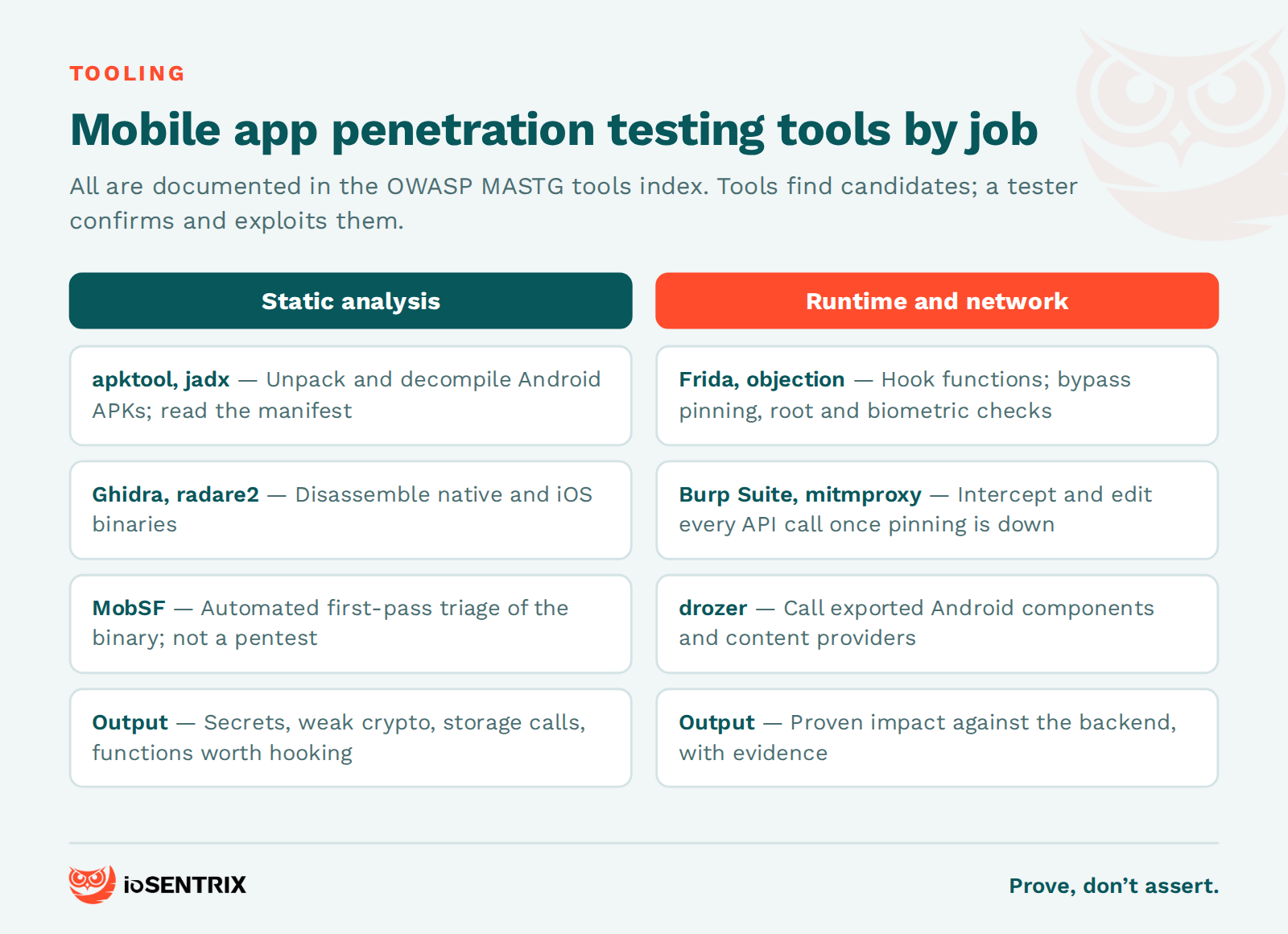
Frida is the workhorse. It injects a JavaScript engine into the running app so a tester can hook functions, read and change arguments and return values, and dump memory. Bypassing certificate pinning, root or jailbreak detection, and biometric checks are typically one short script each. objection is a Frida-based toolkit that packages the most common tasks (listing keychain and storage contents, disabling pinning, dumping classes) into commands, which speeds up the first hours of a test.
MobSF automates the first pass of static and dynamic analysis. It unpacks the binary, flags obvious issues such as insecure permissions, debug flags and hardcoded strings, and produces a report in minutes. It is useful for triage and for CI pipelines. It is not a penetration test, and a vendor whose deliverable is a MobSF report has scanned your app, not tested it.
Burp Suite and mitmproxy sit between the app and its backend. Once pinning is bypassed, every API call is visible and editable, and the backend testing that follows is the same discipline as an API security assessment: authentication, authorization, rate limiting, input handling and business logic. On Android, drozer additionally lets a tester interact with exported components and content providers directly, which is how many local privilege and data-exposure findings are confirmed.
iOS penetration testing and Android penetration testing share a methodology but differ in where the attack surface lives and how much effort the platform demands before testing can begin. Android exposes more: APK files decompile to readable code, exported activities, services, broadcast receivers and content providers can be called by other apps, and data lands in SharedPreferences, SQLite databases and external storage where it is easy to inspect. iOS is more locked down by default, so an iOS pentest spends more time on obtaining a jailbroken device or a suitable simulator, decrypting the binary, and working with the Keychain, entitlements and App Transport Security settings.
On Android, the checklist emphasizes the manifest (exported components, permissions, debuggable and allowBackup flags), intent handling, WebView configuration, and storage outside the app sandbox. Device fragmentation means OEM-specific behaviors can also change results between handsets.
On iOS, the checklist emphasizes Keychain access classes, data protection classes for files, App Transport Security exceptions in Info.plist, URL scheme and universal link handling, jailbreak detection and its bypass, and whether sensitive screens are masked in the app switcher. iOS apps are not safer by default; they are harder to start testing, which is a different thing.
Backend findings are usually shared. If the API accepts a manipulated request from the Android client, it accepts it from the iOS client too. That is why a mobile engagement covering one platform should still test the API layer fully.
A mobile application penetration testing service should include scoping against a named MASVS profile, testing of the app binary on both platforms in scope, dynamic analysis on rooted and jailbroken devices, full testing of the backend APIs the app depends on, a report with reproduction steps and platform-specific fixes, and a retest of remediated findings. Anything less is a partial assessment, and the proposal should say which parts are missing.
Scope. The main variables are the number of platforms, the number of user roles and authenticated workflows, the number of backend API endpoints, and the MASVS profile. A single-platform app with one role and a dozen endpoints is a small engagement; a dual-platform banking app with MAS-L2 plus MAS-R, multiple roles, and a large API is not. Third-party SDKs and embedded WebViews add scope that is easy to miss when estimating.
Duration. How long a mobile penetration test takes depends on those same variables. Expect the engagement to be measured in days for a small single-platform app and in weeks for a dual-platform, multi-role application at MAS-L2 or above, with additional time for the retest. Ask the provider to show how the estimate was derived from your app's scope rather than quoting a flat figure.
Cost. Pricing follows scope and duration. Our guide to penetration testing cost explains the pricing models and what drives them; the short version is that a quote you receive without a scoping conversation is a guess.
Deliverables. Ask for a sample report before you sign. It should show findings mapped to MASVS controls and OWASP Mobile Top 10 categories, severity with a stated rationale, exact reproduction steps including the Frida or proxy evidence, and remediation written for the platform in question. It should also state what was not tested and why.
This checklist condenses the MASVS control groups into the questions a tester answers on every engagement. It is also a useful self-assessment for a development team before the test begins, and a way to check whether a vendor's report covered the ground.
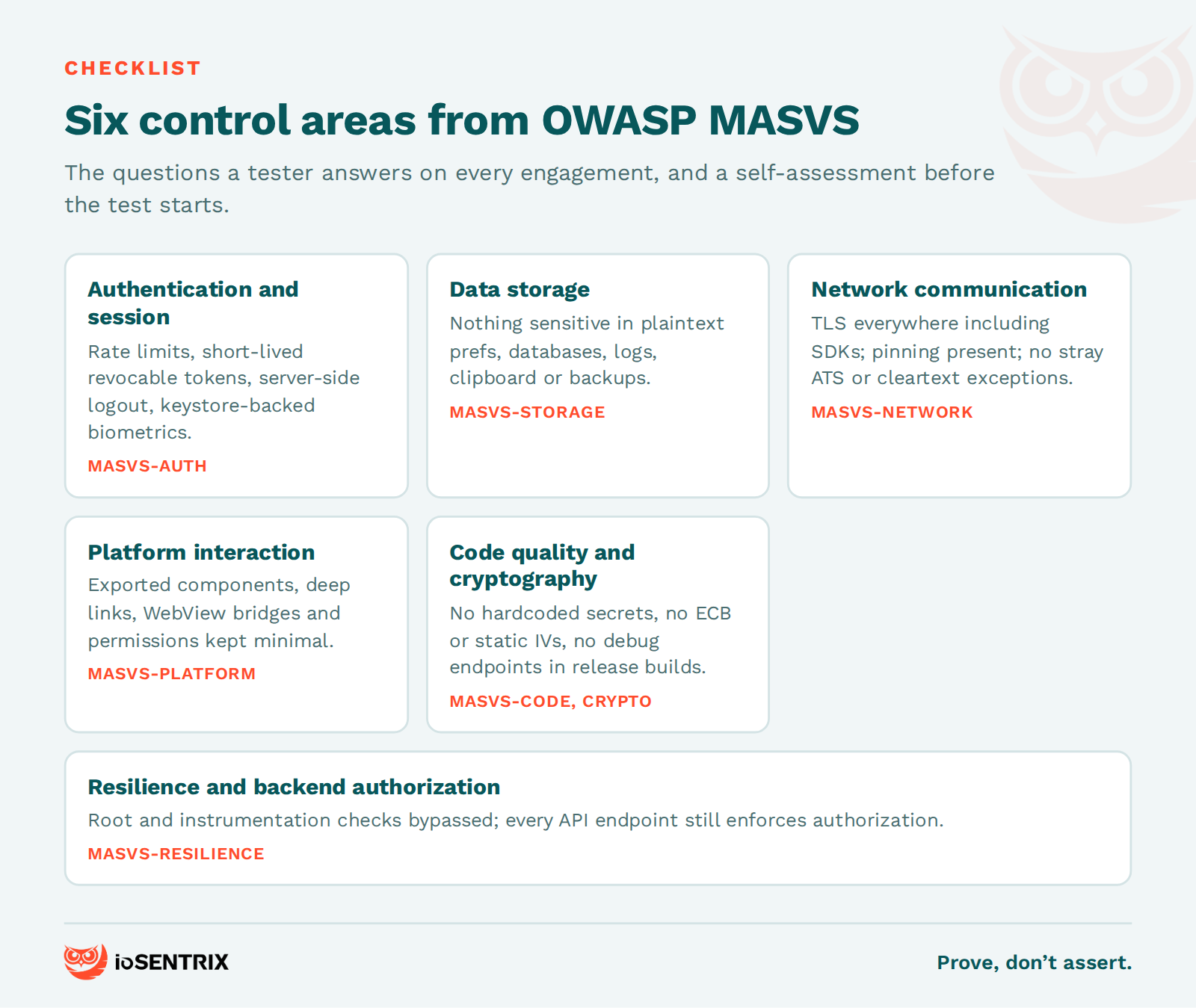
Can the login endpoint be brute-forced or is it rate-limited? Are tokens short-lived and revocable? Where does the app store the session token, and can it be read from a rooted device? Does logout actually invalidate the token server-side? Are biometric prompts backed by the platform keystore or just a UI check that instrumentation can skip?
What does the app write to SharedPreferences, SQLite, files, logs, the clipboard and the pasteboard? Is any of it sensitive, and is it encrypted with a key held in the Android Keystore or iOS Keychain rather than in code? Does the Android allowBackup flag or an unencrypted iOS device backup expose it? Are screenshots of sensitive screens prevented?
Is TLS enforced for every connection, including SDK traffic? Is certificate pinning present, and does the backend still validate everything when pinning is bypassed? Are there ATS exceptions or cleartext-traffic permissions in the configuration that should not be there?
Which Android components are exported, and what can a malicious app do by calling them? How does the app handle deep links, custom URL schemes and universal links? Are WebViews configured with JavaScript bridges that expose native functionality? Are permissions minimal?
Are secrets hardcoded? Which algorithms and modes are in use, and are any of them weak or misused (static IVs, ECB mode, MD5 or SHA-1 for anything security-relevant)? Is input from the backend and from other apps validated? Are debug flags and development endpoints left in the release build?
Does the app detect root, jailbreak, debuggers and instrumentation, and how quickly can those checks be bypassed? More importantly, what happens at the API once they are: does every endpoint enforce authorization server-side, or does it trust the client? Mobile application vulnerability testing that skips the backend misses the findings that matter most.
The most common mobile app vulnerabilities are the ones in the OWASP Mobile Top 10 (2024): improper credential usage, inadequate supply chain security, insecure authentication and authorization, insufficient input and output validation, insecure communication, inadequate privacy controls, insufficient binary protections, security misconfiguration, insecure data storage, and insufficient cryptography. In practice, four of them account for most of the critical findings we report.
Insecure data storage is still the most frequent. Tokens, personal data and even credentials end up in plaintext preferences, databases and logs because the developer assumed the sandbox was enough. On a rooted device it is not, and on an unrooted device a backup often exposes the same files.
Insecure authentication and authorization is the most damaging, because it leads directly to account takeover and cross-user data access. Long-lived tokens without rotation, missing rate limits, and backend endpoints that check "is logged in" but not "is this user allowed to see this record" are the recurring pattern.
Insufficient cryptography usually means the encryption exists but is misapplied: a hardcoded key, a weak algorithm, or client-only encryption that leaves the API in cleartext. Insufficient binary protections and improper credential usage overlap heavily with reverse engineering exposure: hardcoded API keys, embedded third-party secrets and hidden debug endpoints that a decompiler reveals in minutes. Our guide to the biggest mobile app security risks goes deeper on each.
The fastest way to reduce findings is to stop trusting the client. Enforce every authorization decision on the server, treat the app binary as public, and keep secrets out of it. Then adopt the relevant MASVS profile as a design standard rather than a post-release checklist, run automated static analysis and dependency scanning in CI to catch the obvious issues early, and schedule a manual penetration test after major releases, new SDK integrations and significant backend changes. Automation catches the low-hanging issues; it does not find the business-logic and authorization flaws that produce breaches.
Mobile app penetration testing is a manual, adversarial security assessment of an iOS or Android application and its backend APIs, performed on a device the tester controls. It combines reverse engineering, runtime instrumentation and API testing to find exploitable vulnerabilities and proves them with evidence.
It depends on the number of platforms, user roles and API endpoints, and on the MASVS profile chosen. A small single-platform app takes days; a dual-platform, multi-role application tested at MAS-L2 or with MAS-R takes weeks, plus time for the retest. A provider should be able to explain how their estimate maps to your scope.
Frida and objection for runtime instrumentation, Burp Suite or mitmproxy for intercepting traffic, MobSF for automated triage, apktool and jadx for Android decompilation, and Ghidra or radare2 for binary disassembly. All are referenced in the OWASP MASTG. Tools find candidates; a tester confirms and exploits them.
MASVS is the standard: the list of security controls a mobile app should meet, currently version 2.1.0 across eight control groups. MASTG is the testing guide that explains how to verify each control, currently version 2.0.0, and it hosts the MAS profiles (MAS-L1, MAS-L2, MAS-R, MAS-P) that set the depth of a test.
It takes more effort to set up, because the platform is more locked down and the binary must be decrypted on a jailbroken device before analysis. It is not harder to find vulnerabilities once testing begins, and the backend API findings are usually identical across both platforms.
At least annually and after major releases, new third-party SDK integrations, authentication changes or significant backend changes. Many compliance frameworks require annual testing; the cadence that reduces risk tracks your release cycle.
ioSENTRIX is a CREST-accredited penetration testing firm, ISO/IEC 27001 certified and SOC 2 Type 2 attested. Our mobile application penetration testing service scopes against a named MASVS profile, tests the iOS and Android binaries on instrumented devices, covers the backend APIs in full, and delivers findings with reproduction evidence, MASVS mapping and a retest. We do not hand you a scanner report; we show you what an attacker could reach and prove that the fix closed it.
If you need to scope a test for an upcoming release, a compliance deadline or a security questionnaire from a customer, talk to us and we will size it against your app rather than a price list.