October 16, 2026
How Do You Test an MCP Server for Security Issues?
How Do You Test an MCP Server for Security Issues?

Omair


Omair Manzoor is the Founder, CEO, and Chief Hacker of ioSENTRIX, a CREST-accredited cybersecurity firm. With 14+ years in offensive security, he has led penetration tests for Fortune 500 companies including engagements for Amazon, Bank of America, VISA, and the London Underground. His exploits are part of the Metasploit Framework and Immunity Canvas. Omair is a published researcher, conference keynote speaker (DOD, CISA, BSides), and technical reviewer for academic security textbooks.
Open your AI acceptable-use policy. There is almost certainly a line in it that says employees must not put customer data into public AI tools. It was written by someone competent, approved by legal, and acknowledged in your onboarding flow.
Now answer a harder question. If a support rep pasted a customer record into a chat assistant last Tuesday, would you know?
In our experience, few mid-market teams can. Not because the policy is bad, but because nobody has tested it. And AI data leakage testing is the part most programs skip, because the control feels like a people problem rather than a technical one.
AI data leakage testing is the practice of proving whether customer data can reach an AI model, rather than assuming a policy prevents it. You seed uniquely identifiable synthetic records, exercise every path data can take into an assistant, and then hunt for those records in the logs, tenants, and connectors you control.
An AI policy misses where the data goes because it governs a named tool while the exposure follows a data path. That is the shift worth naming honestly. When your policy was written the two were the same thing: "AI tool" meant a website an employee visits, one destination, one browser tab, one obvious thing to block.
That is no longer where the data goes. AI has been absorbed into the software you already own. The helpdesk drafts replies. The CRM summarizes accounts. The code editor completes functions. Browser extensions read whatever page is open. None of that requires anyone to visit a chat assistant, and none of it trips a policy written against one.
So the control you wrote is scoped to a brand name, and your actual exposure is scoped to a data path. Those two things stopped matching some time ago, and the gap is invisible until someone goes looking for it.
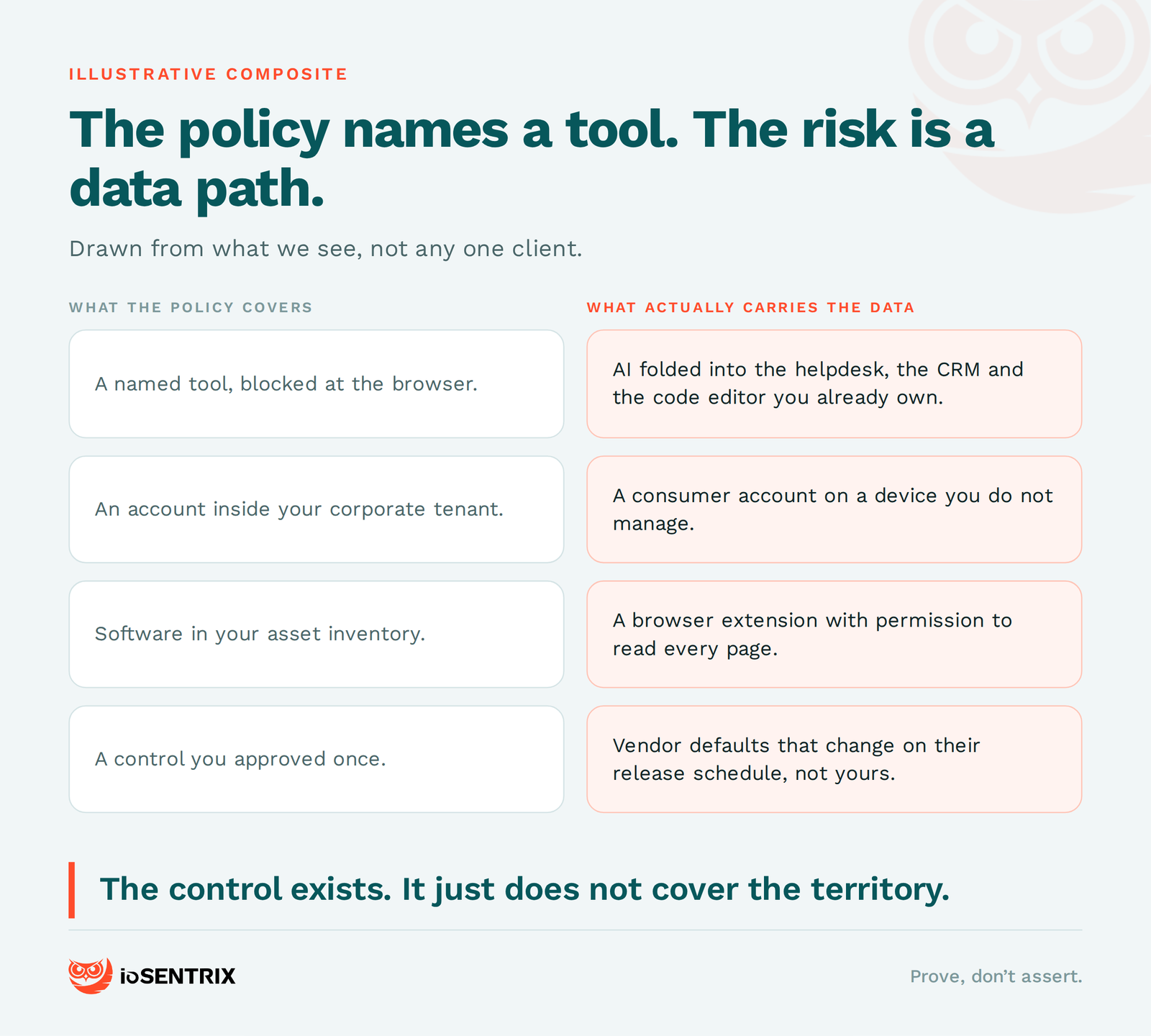
Through five paths, and a policy written against a brand name covers two of them: personal accounts on unmanaged devices, browser extensions that read whatever page is open, AI features switched on inside SaaS you already pay for, developer tooling, and the approved tool itself when it is misconfigured.
What follows is a composite drawn from what we see, not any one client. A mid-market SaaS company has a clear policy: no customer data in public AI tools, enterprise ChatGPT is approved, everything else is not. On paper, one control. In practice, five paths around it.
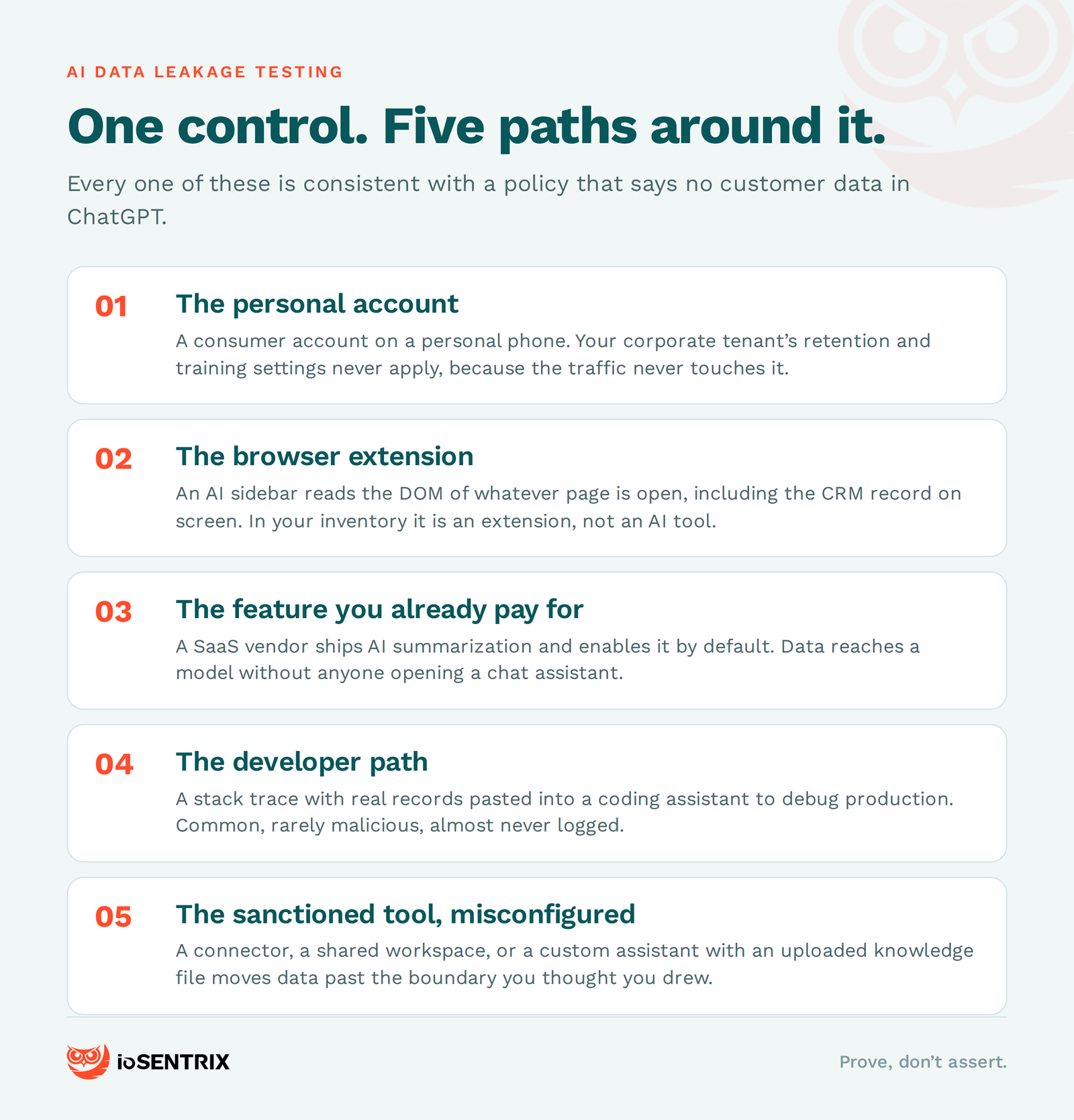
The personal account. Someone uses a consumer account on a personal phone. The corporate tenant's retention and training settings never apply, because the traffic never touches the corporate tenant. Your policy governs an account nobody is logged into.
The browser extension. An "AI assistant" sidebar reads the DOM of whatever page is open, including the CRM record on screen, and ships it to a third-party API. In your asset inventory it is a browser extension, not an AI tool. Nobody classified it as one.
The feature you already pay for. A SaaS vendor ships an AI summarization feature and enables it by default in the next release. Customer data now reaches a model through an API you never reviewed, often via a subprocessor, and the policy is untouched because nobody opened ChatGPT.
The developer path. An engineer pastes a stack trace into a coding assistant to debug a production issue. The trace contains real records. This one is rarely malicious and easy to miss, because it is seldom logged anywhere you would look.
The sanctioned tool, misconfigured. The enterprise plan is genuinely approved, but a connector, a shared workspace, or a custom assistant with an uploaded knowledge file moves data outside the boundary you thought you had drawn.
Three of these fall outside what the policy covers at all. The other two fall squarely inside it and still go unnoticed, which is the same problem wearing different clothes. Either way the control exists, and either way it does not cover the territory.
This is where we keep landing: prove, don't assert. A policy is a claim about behavior. Testing turns it into evidence. Each of the five paths has a test, and none of them require a large program to start.
The technique that makes the rest work is canary data: uniquely identifiable synthetic records, planted in the systems that hold real customer data, which prove a leak the moment one of them turns up somewhere it should not be. Seed them yourself. Not obviously fake ones, just unique ones — a name string with no plausible natural occurrence, a distinctive address, an account number that matches your format but belongs to nobody. Search each string first and confirm it returns nothing, then seed it. Now you have something to hunt for across your proxy and DNS logs, your DLP match history, and any assistant workspace or connector you administer. Be clear about the limit: a canary proves egress you can observe. It cannot tell you what a vendor retained or trained on once the data left.
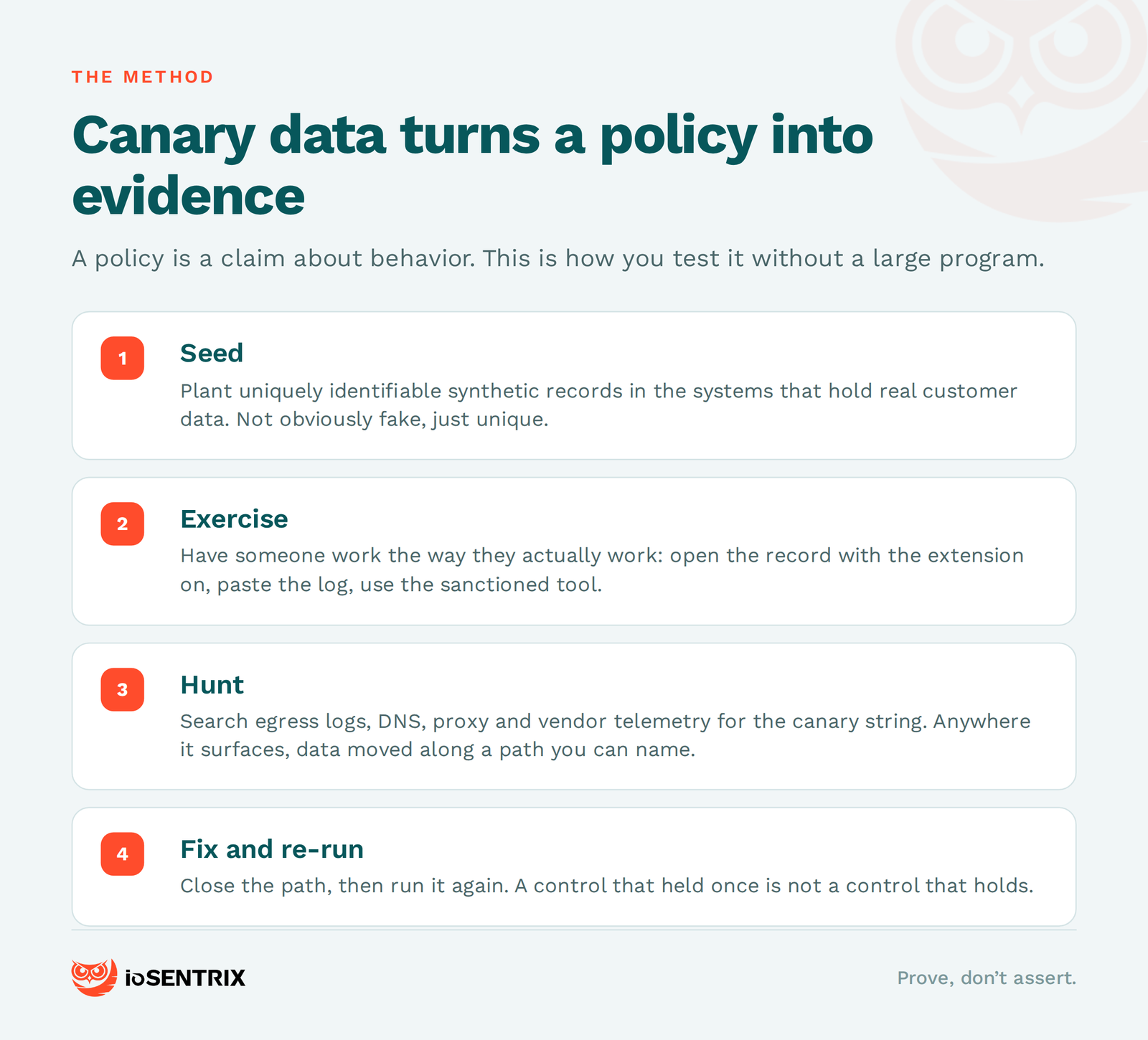
With canaries in place, the five paths become five concrete tests.
For personal accounts, check egress rather than policy. Pull DNS and proxy logs and look for the consumer endpoints of the assistants you approved in enterprise form, not just the enterprise ones. Then repeat from an unmanaged device on guest Wi-Fi. This finds the on-network share of that path and nothing else; a personal phone on cellular is simply unobservable from your network, which is itself the finding, and it pushes the control toward data-side detection rather than egress monitoring.
For browser extensions, enumerate what is installed across the fleet and which ones hold broad host permissions. Then open a canary-seeded record with the extension active and capture outbound traffic from that host with an inspecting proxy or your endpoint network telemetry.
For the features you already pay for, inventory which AI capabilities are switched on in each SaaS tenant, whether the toggle is admin-controlled or user-controlled, and what the data processing agreement actually says about subprocessors and model training. Vendor defaults change on their release schedule, not yours, which is why this is a recurring check rather than a one-time audit.
For the developer path, put canaries in the data that ends up in logs and test fixtures, then check whether your assistant's workspace retains history and who can read it.
For the sanctioned tool, try to get data out through the approved product on purpose, using canary data only, with admin sign-off and a defined test window. Build a connector, share a workspace outward, upload a knowledge file. If a determined employee can move data past the boundary without breaking a rule, the boundary is smaller than the diagram suggests.
Frameworks help you organize this. The OWASP Top 10 for LLM Applications, refreshed in 2026, treats sensitive information disclosure as a top-tier risk, and we have a plain-language walkthrough of that list if it is new to you. NIST's AI RMF gives you a governance structure to hang it on, CSA's AI Controls Matrix gives you a control set that covers AI data governance, and ISO/IEC 42001 gives you a certifiable management system — though note that certifying a management system is not the same as proving any given control held. Use all of them as maps. None of them is a test, and mapping your policy to a framework is not evidence that the policy holds.
None of this eliminates the risk. People will paste things into boxes, and some of that will be fine. The goal is narrower and more achievable: know which paths exist, know which ones you can see, and stop being surprised. That is also the honest scope of an AI risk assessment — it maps and ranks exposure, it does not make it go away.
If you want a self-check before you talk to anyone, take your five most sensitive data stores and answer five questions with evidence rather than intent. Could a consumer account reach them from an unmanaged device? Does any browser extension in your fleet have permission to read them? Who controls whether AI features are switched on in the SaaS that touches them? Do they leak into logs and test data that reach a coding assistant? And can data leave through your approved tool without anyone breaking a rule?
If the answers are mostly "probably not" rather than "here is the log," that is the gap. It is a normal place to be right now, and it is worth closing before someone finds it for you.
No. Three of the five paths never touch a chat assistant. Data reaches a model through browser extensions, through AI features enabled by default in SaaS you already pay for, and through developer tooling.
No. A canary proves egress you can observe: that a record left a system you watch. It cannot tell you what a vendor retained, passed to a subprocessor, or trained on once the data was gone.
No, and you should not use it. Every test here runs on canary records: synthetic, uniquely identifiable, and confirmed to return nothing before you seed them.
On your vendors' schedule rather than your own. SaaS vendors switch AI features on in ordinary releases and change defaults without asking, which makes this a recurring check rather than a one-time audit.
We are a CREST-accredited, ISO/IEC 27001 certified offensive security firm. Our AI and ML penetration testing covers exactly this: we map the paths your data can actually take, attempt them under an agreed scope, and hand you the attempt, the result, and the artifact rather than a spreadsheet of control statuses. For teams without an in-house security lead to own the policy in the first place, our vCISO service covers that too. We are services-first, so we assure the stack you already chose.
If you want a second set of eyes on the paths around your AI policy, get in touch.